
BC time-zone change may affect calendar meetings
October 19, 2026
Updated October 28, 2026
Beginning November 1, 2026, most of British Columbia will remain on Pacific Time (PCT) year-round and will no longer set clocks back in the fall.
This change may affect how calendar events scheduled for November 1 or later appear in Outlook and on some devices. During the transition, a meeting may appear at a different time depending on the device or application you use. For example, a meeting scheduled for 10 a.m. may appear as 11 a.m. somewhere else.
University Systems is taking the following actions to prepare for the change:
- We will release a Windows update the week of October 13th to add support for BC’s new time zone.
- On October 20th,
- We will move managed Windows devices currently using the Pacific Standard Time to the new BC time zone.
- We will move managed Apple computers to the Vancouver time zone if they are not already using it.
- UVic Exchange Online mailboxes using the Pacific Standard Time will be moved to the new time zone.
- Working hours in Outlook will be set to the Yukon time zone, as there is a bug with PCT that breaks the free/busy time feature. Once this is fixed, we will change working hours to PCT.
- Room booking calendars will be changed to temporarily allow conflicting meetings. This allows meetings to be fixed over the next few weeks. This setting will be reset in the first few weeks of November.
Faculty and Staff
If you organize meetings:
- Check meetings scheduled for November 1 or later to make sure they display at the intended time.
- Pay particular attention to important meetings, recurring meetings and meetings with people outside BC.
- If you organize a meeting or recurring meeting, review its time-zone setting after the October 20th change. Organizers may need to update the time zone selected for meetings and meeting series occurring November 1 onward.
- Do not manually change your device time zone to correct a meeting.
Pay particular attention to recurring meetings. Testing has identified cases where changing the time zone for a meeting series did not consistently update every occurrence.
If you use macOS or iOS, take extra care when reviewing your calendar. Testing has identified different calendar behavior before and after meetings have been updated to the new BC time zone.
If you use a UVic managed Windows computer:
On October 20 University Systems will automatically set the operating system and Outlook desktop app time zone to the new time zone for BC. Your PC's working hours time zone will be set to (UTC-07:00) Yukon time as there is a bug in the new BC time zone for working time. We will automatically change this once Microsoft releases a patch.
-
After October 20th, please confirm your Windows operating system time zone is set to (UTC-07:00) Pacific Time (British Columbia). You can check this in System settings. Note: Do not change this setting yourself. If it's incorrect, please contact IT support.
-
Fix the time zone for meetings that take place Nov 1 and later. You can find detailed instructions in If a meeting time looks wrong section.
If you use a UVic managed Mac computer:
On October 20 University Systems will automatically set the operating system and Outlook desktop app time zone to the new time zone for BC.
-
After October 20, confirm the Mac OS time zone is set to Vancouver Time. You can check this is System settings. Note: Do not change this setting yourself. If it's incorrect, please contact IT support.
-
After October 20, confirm the Outlook desktop app time zone settings are set to Pacific Time (PCT). Note: Do not change this setting yourself. If it's incorrect, please contact IT support.
- Do not yet change Outlook on Mac to Pacific Time (British Columbia), as it will not reflect the correct time.
Students
Your class and assignment times have not changed.
Depending on your device, email application and where your calendar is stored, calendar events may display at the wrong time after November 1.
To make sure you have the correct information:
- Check your official class schedule in Online Tools. You can download a fresh copy of your schedule if needed.
- Check Brightspace for assignment due dates.
- If you are unsure about an assignment due date, ask your instructor.
- Do not rely only on a calendar entry if its time conflicts with your official class schedule or the information in Brightspace.
If a meeting time looks wrong
If the same meeting appears at different times on different devices or applications, check the meeting carefully before changing it.
Do not manually change your device time zone to correct the meeting.
For assistance, contact your IT support team or the Computer Help Desk.
Use Outlook calendar on the web to make fix meetings.
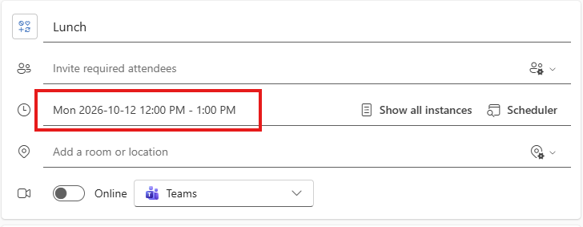
- Open the stand-alone meeting and click on the date and time:
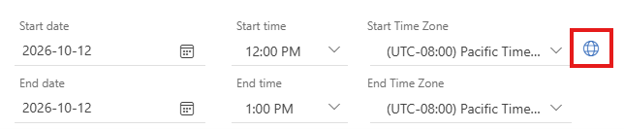
- In the dropdown, click on the Globe icon beside the meeting time and change the time zone to (UTC-07:00) Pacific Time (British Columbia):
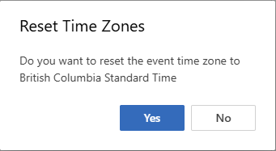
- You will receive a “Reset Time Zones” confirmation window:
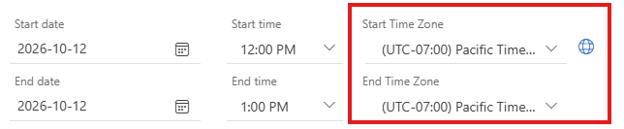
- Click Yes and confirm the time zone is now showing correctly as (UTC-07:00) Pacific Time (British Columbia):
- Click Save to save the change.
Use Outlook calendar on the web to fix meetings.
- Open a meeting in the series and click on Show all instances.
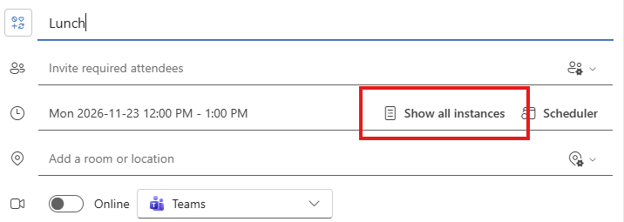
- Look for any instances of the meeting that no longer appear in the series or have different times and make a note of them. Once you have noted all these instances, click Back to event details.
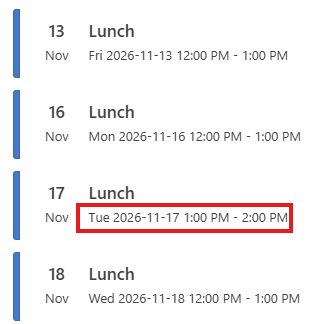
- Along the top of the window, click Edit series to apply all changes you will make to the entire series.

- Click on the date and time:
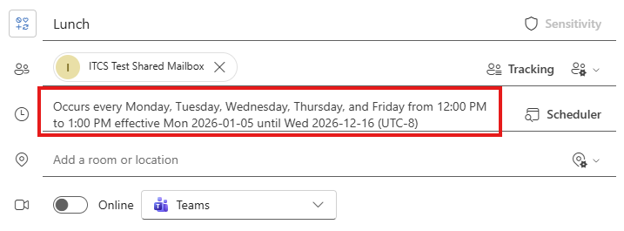
- In the dropdown, click on the Globe icon beside the meeting time and change the time zone to (UTC-07:00) Pacific Time (British Columbia):
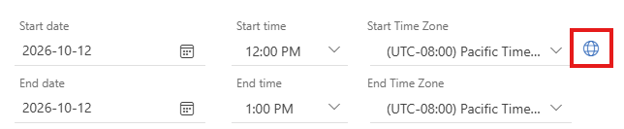
- You will receive a “Reset Time Zones” confirmation window:
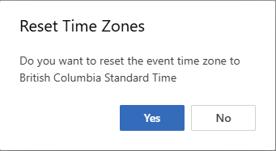
- Click Yes and confirm the time zone is now showing correctly as (UTC-07:00) Pacific Time (British Columbia):
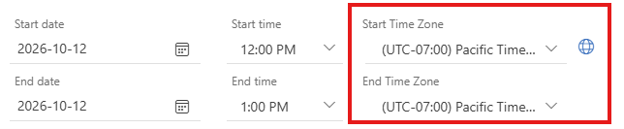
- Click Send. You will see an “Edit series” window.
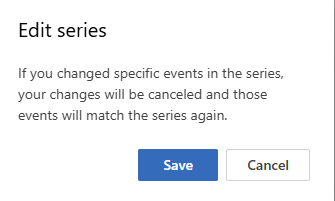
Click Save to save the changes and send them to all meeting attendees. - Review any modified or deleted calendar items you noted in Step 3. Reopen the series and click show all instances
- Verify that Outlook did not recreate any previously deleted calendar events.
- Find the calendar events with previous changes to their date and/or time.
- Verify the time zone is correct on the item and change to (UTC-07:00) Pacific Time (British Columbia) if necessary (repeat steps 4-7 on the event).
- Verify the modified time is correct and change if needed.
Use Outlook calendar on the web to fix meetings.
- In the calendar tab, make sure you have the shared mailbox selected in the left-hand side list of calendars.
- If it isn't in the list, add it by clicking Add calendar.
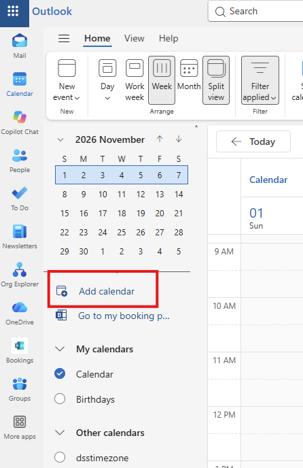
- Search for the shared mailbox in the “Enter a name or email address” text field and select it from the drop-down list. Click Add.
- To fix stand-alone meetings in the shared mailbox calendar, see the “How do I fix my stand-alone Outlook calendar meetings?” question above.
- To fix recurring meetings in the shared mailbox calendar, see the “How do I fix recurring Outlook calendar meetings?” question above.
You can make corrections to any calendars that you help to manage. Follow the same steps as you would for your own calendar. Use Outlook calendar on the web to fix meetings.
- To fix stand-alone meetings, see the “How do I fix my stand-alone Outlook calendar meetings?” instructions above.
- To fix recurring meetings, see the “How do I fix recurring Outlook calendar meetings?” instructions above.
- NOTE: As a delegate you may or may not have access to view and edit private meetings.
- If you do have access to edit private meetings, you may fix the meetings by following the instructions above.
- If you do not have access to edit private meetings, the calendar owner must fix these them.
Some users are being temporarily blocked from sending email when updating their calendars because they have reached their mailbox sending quota. This is occurring because the meetings they are updating have a large number of attendees.
When you update a meeting's time zone, an individual update is sent to each attendee. Each update counts as one email towards the mailbox's sending quota. As a user continues to update their meetings, each updated meeting contributes to their sending quota, until they hit their limit and their mailbox is blocked.
To address this, mailbox sending quota limits have been raised until Nov. 6, 2026. Users will be able to send:
- 1,000 emails per hour to UVic email addresses
- 400 emails per hour to external email addresses
- 2,000 emails total per 24-hour period
If you are updating the time zones in your calendar and believe that you will still exceed these limits, contact your IT support staff before updating your meetings. They will put an exception in place on your mailbox to raise the quota limit to the maximum allowed by Microsoft:
- No hourly limit on emails sent
- 10,000 emails per 24-hour period
If you have an exception in place and think you may still reach the 10,000-email limit while updating calendar events, wait until the next day before continuing. This will prevent your mailbox from being blocked by Microsoft's sending limits.
Classic Outlook
Outlook's free/busy setting does not currently work with the new BC time zone. Until this is fixed, we have set Outlook mailbox work hours settings to Yukon Standard Time.
Unfortunately, this fix does not work for classic Outlook. Instead, users must switch to new Outlook or change their Windows time zone setting to Yukon Standard Time. We strongly suggest users move to new Outlook. If you choose to remain on classic Outlook, follow the steps below.
Managed Windows computers
In Company Portal or Software Centre, install the new Set time zone to the Yukon app. The app will set your time zone to Yukon Standard Time. Note: calendar items from Nov. 2, 2025, to March 8, 2026, will be off by one hour.
Unmanaged Windows computers
Manually set the Windows time zone to Yukon Standard Time. Note: calendar items from Nov. 2, 2025, to March 8, 2026, will be off by one hour.
Microsoft Bookings
To fix the issue:
- Sign in to the Bookings web portal.
- Open the Shared Bookings calendar.
- Go to Booking page > Region and time zone settings.
- Set the time zone to (UTC-07:00) Yukon.
- Select Always show time slots in business time zone.
- Click Save.
Some guests using Bookings with Me may see a "We could not fulfill your request" error, or they may see incorrect appointment times when booking as a guest. The booking may still be created, but confirmation emails may not be sent correctly.
UVic users
Sign in with your Microsoft 365 account when prompted. This avoids the issue and displays the correct available times.
Guest users
Select the correct time zone before booking. Use the globe icon and choose (UTC-07:00) Yukon to ensure available times are displayed correctly.
If you are an organizer, consider adding a note to your Bookings with Me meeting types advising guests to select (UTC-07:00) Yukon when they are booking.
Power BI
Microsoft has not yet released the UTC-7 Pacific Time (British Columbia) time zone for scheduled Power BI semantic model refreshes. If you use scheduled semantic model refreshes, manually change the time zone from UTC-8 Pacific Time (US & Canada) to UTC-7 Arizona before November 1, 2026.
Power Automate
Microsoft has not yet released the UTC-7 Pacific Time (British Columbia) time zone for Power Automate. If you use time-based triggers or actions configured to use UTC-8 Pacific Time (US & Canada), manually change the time zone to UTC-7 Arizona before November 1, 2026.
We will update this notice when Microsoft has released UTC-7 Pacific Time (British Columbia) time zone for Power BI and Power Automate.
Frequently Asked Questions
- Open your Calendar in Outlook and select File > Print or the Ctrl+P to open the Print menu.
- Select the Weekly Calendar Style or Monthly Style in the Settings menu.
- Select Microsoft Print to PDF as your printer.
- Click the Print button and follow the on-screen options to save your calendar as a PDF file for future reference.