TD1 personal tax credits
All employees recieve a TD1 form with the default basic amounts when they are initially hired. At the start of each calendar year, the TD1 is reset with the basic default amounts.
The payroll office estimates your taxes based on what we know about your income and CRA rules, but we don’t know all the details of your specific situation, such as whether you have paid tuition or earned income from other sources. A TD1 form gives you the opportunity to revise the estimate of your taxes and help the tax algorithm that our system uses be more accurate.
Viewing your TD1 personal tax credit form
- Go to the employee services section of online tools
- Click on the link for TD1 personal tax credits (this will take you into the employee dashboard)
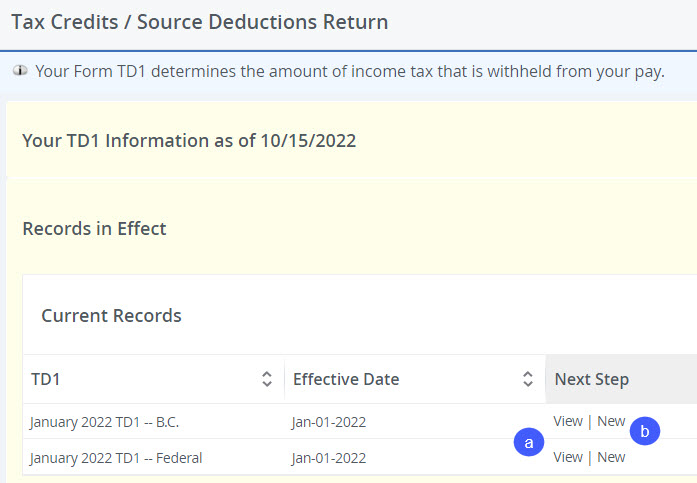
- The information that displays is the current tax credits / source deductions return (TD1).
- You can view the details of the BC or Federal TD1 by clicking ‘View’ under the ‘Current Records’ section
- You can add a new TD1 by clicking ‘New’ under the ‘Current Records’ section
Adding a new TD1 personal tax credit form
If you are working on reserve and are eligible for a tax exemption, complete a TD1-IN and forward it to your excluded manager for them to complete the employer portion and submit the form to payroll.
If you want to change the taxes deducted from your pay, you may choose to complete a new TD1 form.
- Click ‘New’ (see ‘b’) in the screen shot above
- Add a new effective date, this date must be later than your last pay date (ie if you got paid on February 15th, your effective date has to be February 16th or later)
- Complete the TD1 form as your personal situation requires
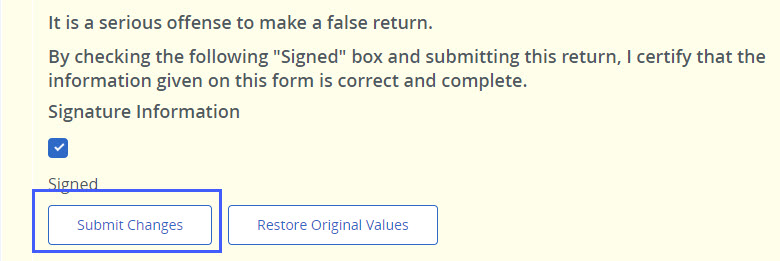
- Check the "Signed" checkbox, and
- Click the ‘Submit Changes’ button at the bottom of the screen.